
-

Try advanced features for free
Get Smarter responses, upload files, create images, and more by logging in.
Log In Sign up & Earn $5

Gemini Alternatives: Which Seven AI Tools Should You Try?
Key Takeaways
- ChatGPT, Claude, and Perplexity each beat Gemini at something specific. None beats it at everything.
- Free Gemini alternatives are easy to find, so try two or three before paying anyone.
- What you need (essays, code, spreadsheets, sources) should decide the tool, not the buzz.
- Privacy and usage limits deserve a look before you upload anything that matters.
Gemini isn't bad. Plenty of people like it. But if your day doesn't revolve around Gmail and Google Docs, it can feel oddly average.
That's usually the moment people start hunting for Gemini alternatives. I've pulled together seven AI tools like Gemini and sorted them by what you're likely to need: writing, code, research, work, or homework. Sound useful? Keep reading.
What are the Best Gemini Alternatives?
Seven names come up again and again: ChatGPT, Claude, Perplexity, Microsoft Copilot, Grok, DeepSeek, and Cabina.AI. Nobody wins every category. The better question is what you do most often, because that should steer the choice, along with budget and the apps already on your screen.
Why Look for Google Gemini Alternatives?
Google Gemini alternatives get searched for a few boring reasons. Gemini feels strongest inside Gmail, Docs, and Meet, and a bit flat outside them. Some users want firmer privacy settings. Others care about pricing clarity. A few just want answers that stay on topic.
Which Gemini AI Alternatives are Worth Trying?
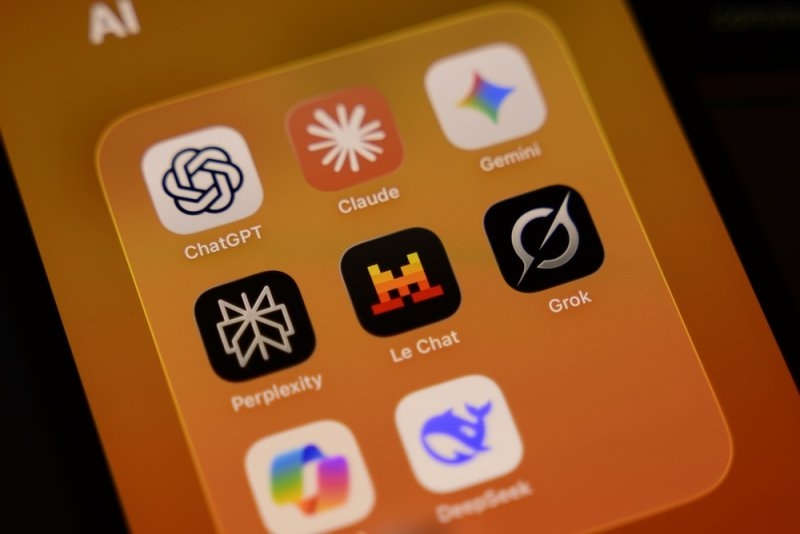
Here are seven Gemini AI alternatives, each with a different personality. Read the short notes, bookmark the two that sound closest to your day, and ignore the rest for now. You can always swap later, since nobody's locking you into a contract on day one.
1. ChatGPT: The Versatile Pick Among Gemini Competitors
If you want one tool that does a little of everything, start here. ChatGPT writes, summarizes, brainstorms, crunches numbers, and works with images too. It has a free version. Paid tiers exist for heavy users, but plenty of people never need them.
2. Claude: A Thoughtful Choice for Long Documents
Claude reads long documents without getting lost, which is rarer than it sounds. Its writing also tends to feel less stiff. Many writers and developers reach for it when they want a reply that reads as a colleague wrote it, not a template.
3. Perplexity: Best for Cited Research Answers
Ask Perplexity a question, and it hands you an answer with sources attached. You can click through and check. For anyone doing homework, market research, or news reading, that single feature saves a lot of second-guessing, and it makes the tool feel more honest.
4. Microsoft Copilot: Ideal for Office Users
Microsoft Copilot sits inside Word, Excel, PowerPoint, and Teams. That's the whole pitch, really. If your employer already pays for Microsoft 365, you can have it summarize a meeting or clean up a messy spreadsheet without ever opening another browser tab.
5. Grok: Strong for Real-Time Social Insights
Grok taps into the web and X in real time, so it suits people who live inside breaking news. Treat it carefully, though. Social posts spread rumors fast, and an AI summary can make a rumor sound like a settled fact. Verify anything big before it goes into your own work.
6. DeepSeek: A Strong Pick Among Free Gemini Alternatives
DeepSeek is popular with students and cost-conscious coders because it reasons well and costs little or nothing. The catch is data. Check where your prompts go and how they're stored before pasting in anything private, and especially before pasting in work files from your employer.
7. Cabina.AI: One Workspace for Many Models
Cabina.AI is more of a hub than a single model. You get several well-known AIs in one workspace, which means you can ask them the same question and compare the answers side by side. It's handy if you're still deciding and don't want twelve tabs open.
8. TalkGPT: A Free Gemini Alternative for Everyday Tasks
TalkGPT is a free AI assistant for quick searches, writing help, and everyday questions. Log in, and you can upload files, too, plus keep related chats together in Spaces. Honestly, it's a pretty low-pressure place to start if you're just curious.
Gemini Alternatives Compared at a Glance
Want it all in one place? The table below sums up each tool in a line. A quick warning, though. Pricing and free limits shift constantly in this space, so open the official site and confirm the current plan before you enter a card number.
| Tool | Standout Strength | Ideal User |
| ChatGPT | Versatility | Beginners |
| Claude | Natural writing | Writers, developers |
| Perplexity | Cited sources | Researchers, students |
| Microsoft Copilot | Office integration | Business teams |
| Grok | Live social data | News followers |
| DeepSeek | Low-cost reasoning | Budget coders |
| Cabina.AI | Multi-model hub | Model testers |
Which Gemini Alternatives Fit Your Daily Tasks?
Skip the brand debate for a minute. What's the one task you repeat every week? Start there. The next three sections cover writing, coding, and research, since those are the jobs people mention most when they say they're tired of their current assistant.
Gemini Alternatives for Writing
For writing, try Claude first and ChatGPT second. Both can draft a blog post, tighten an email, or shift a stiff paragraph into something friendlier. Neither replaces you, though. Read every line, fix the facts, and rewrite anything that doesn't sound like you.
Gemini Alternatives for Coding
Coders tend to split between DeepSeek, Claude, and ChatGPT. All three can explain a confusing function, point out a bug, or suggest a cleaner version. Run everything before you trust it. Code that looks right can still break in a way that's annoying to track down later.
Gemini Alternatives for Research
Perplexity is the natural starting point because every answer comes with sources. After that, Claude is good at condensing a long report into a page. ChatGPT can turn your scattered notes into an outline when you're staring at a blank screen and can't figure out where to begin.
Who Benefits Most From These Gemini Alternatives?
A manager and a college student want very different things from an AI. One cares about security and admin controls. The other wants clear explanations and sources for an essay. Here's how the earlier picks sort out for each, with no jargon and no fluff.
Gemini Alternatives for Business
Microsoft Copilot makes the most sense for teams already living in Office. ChatGPT and Claude both help with reports, customer replies, and analysis. Before anyone rolls a tool out company-wide, though, someone should read the security settings, admin controls, and data retention terms. Dull job. Worth doing.
Gemini Alternatives for Students
Students get the most out of Perplexity when they need sources and out of ChatGPT or Claude when a topic just won't click. Ask for a step-by-step explanation, then try the problem yourself. Check your school's AI rules too. Learning beats shortcuts, and teachers often notice copy-paste work.
Are There Free Gemini Alternatives?
Sure, there are lots of free options for Gemini. You can also try ChatGPT, Perplexity, DeepSeek, and Microsoft Copilot, since each has a free tier. The rules for those free plans are not the same for everyone. If you want to dig a bit more, read our guide on how an AI chatbot works and check out our list of ChatGPT alternatives.
Conclusion: Which Gemini Alternatives Should You Choose?
Pick ChatGPT if you want one all-purpose tool. Pick Claude for writing, Perplexity for research, and Copilot if your workday runs on Microsoft. Then test any two for a week with your own real tasks. Whichever one saves you more time is your answer.
Frequently Asked Questions
Should I drop Gemini completely if I use Google Workspace?
Not necessarily. Gemini still fits well if Gmail and Docs run your day. Many people keep it for Google tasks and add another tool for writing, research, or coding where it feels weaker.
Can I use more than one Gemini AI alternative at the same time?
Sure, and plenty of people do. Use one tool for drafting, another for sourced research, and a third for coding. Just keep your private data in as few places as you reasonably can.
How do I switch from Gemini without losing my old chats?
Copy anything you'll honestly want later, like key prompts, useful answers, and long drafts, into a document first. Then start fresh in the new tool and slowly rebuild your favorite prompts there too.
What should I check before sharing private files with AI tools like Gemini?
Read the privacy policy, look for settings that control whether your chats train models, and skip uploading anything sensitive. If a document would worry you in a stranger's hands, leave it out.
Which Gemini competitors are easiest for complete beginners?
ChatGPT and Perplexity are the gentlest starting points, since you just type a question and read the answer. Nothing to configure. TalkGPT is another easy option if you prefer a simple, free chat window.
Recommended Articles

What is AI Code Debug & How Do...
Learning how to build websites is very important today. The tech...
Read More
What Is AI Email Management an...
Email is still the backbone of professional communication. It is...
Read More

What can I help you with?
Unlock more with TalkGPTPlus
TalkGPTPlus gives you higher limits, smarter models, and more.